
Download Falkon – Lightweight, Fast, and Feature‑Packed Web Browser
Overview
Falkon, formerly known as QupZilla, is a free and open‑source web browser built on the powerful QtWebEngine framework. Designed with a clear focus on speed, low memory consumption, and a clean user interface, Falkon delivers a browsing experience that feels both modern and remarkably lightweight. The browser ships with an integrated ad blocker that works out of the box, helping users enjoy faster page loads while reducing data usage.
Whether you choose the standard installer or the portable version, Falkon offers the same set of features without compromising performance. Users can manage bookmarks, switch between multiple search engines, organize tabs, and view their browsing history just like any mainstream browser. For those who crave deeper customization, Falkon supports a variety of plugins that extend its capabilities without adding bloat.
Its straightforward design makes it an excellent choice for older hardware, low‑end laptops, or anyone who simply wants a distraction‑free, secure browsing environment. Because Falkon is open source, the community continuously contributes patches, security updates, and new extensions, ensuring the software stays current and reliable. In short, Falkon blends practicality with meaningful customization, positioning itself as a strong contender among lightweight browsers on Windows, macOS, and Linux.
Key Features That Set Falkon Apart
- Built‑in Ad Blocker – Enables instant blocking of intrusive ads and trackers, improving page load times and privacy.
- QtWebEngine Core – Leverages Chromium’s rendering engine via Qt, delivering modern web standards support while keeping the UI lightweight.
- Portable & Standard Installers – Offers a portable version that runs from a USB stick without registry changes, alongside a traditional installer for permanent setups.
- Bookmark Management – Simple yet powerful bookmark system with folders, drag‑and‑drop organization, and import/export capabilities.
- Multiple Search Engines – Pre‑configured support for Google, DuckDuckGo, Bing, and custom engines, all selectable from the address bar.
- Tab Browsing & Session Restore – Unlimited tabs, visual tab bar, and the ability to restore the previous session after a crash.
- History & Download Manager – Comprehensive history view with search functionality and a lightweight download manager with pause/resume support.
- Plugin Ecosystem – Supports extensions like user‑style sheets, password managers, and RSS readers without inflating the core package.
- Customizable UI – Themes, toolbar placement, and configurable shortcuts let users tailor the browser to their workflow.
- Cross‑Platform Compatibility – Runs smoothly on Windows 7/8/10/11, macOS 10.12+, and major Linux distributions.
Each feature is deliberately engineered to keep Falkon fast while still offering the tools most users expect from a contemporary browser. The ad blocker, for instance, can be toggled off if you prefer to support sites that rely on advertising revenue. The plugin architecture is intentionally minimalistic; it avoids the massive extension stores that can slow down other browsers, yet still provides enough flexibility for power users. Falkon’s UI respects the native look of the operating system, making it feel at home on Windows, macOS, or Linux desktops. Because it’s built on QtWebEngine, it inherits Chromium’s security patches automatically, ensuring you stay protected against emerging web threats without the need for frequent manual updates.
Installation & Usage – Getting Started Quickly
Installing Falkon is straightforward and mirrors the process of installing any typical desktop application. For Windows users, download the installer (either falkon‑setup.exe for the standard version or falkon‑portable.zip for the portable edition) from the official website. Run the executable and follow the on‑screen prompts: accept the license agreement, choose an installation folder, and decide whether to create a desktop shortcut. The portable version simply requires extracting the ZIP archive to your desired location; no registry entries are created, making it ideal for use on shared computers or USB drives.
macOS users can download the .dmg file, drag the Falkon icon into the Applications folder, and launch it like any native app. Linux distributions typically offer Falkon in their repositories, allowing installation via package managers such as apt, dnf, or pacman. For example, on Ubuntu you would run sudo apt install falkon. If you prefer the latest build, the project provides AppImage and Flatpak packages that run on most modern Linux desktops without additional dependencies.
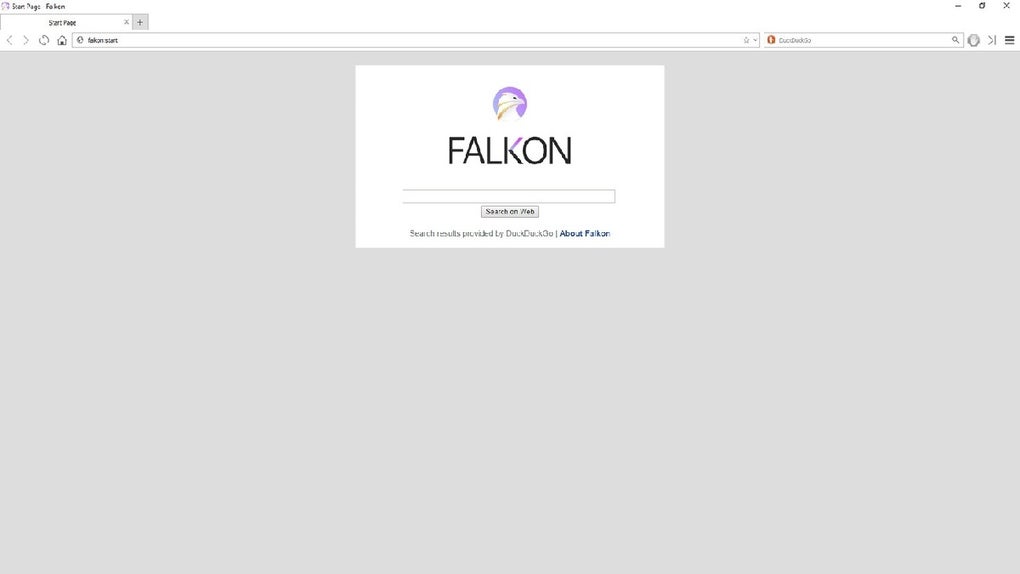
Once installed, Falkon opens to a clean start page featuring a search bar and quick links to your most visited sites. The address bar doubles as a search field, supporting the default engines or any custom engine you add in the settings menu. To import bookmarks from another browser, navigate to Settings → Bookmarks → Import and select the source file (HTML format).
Enabling the built‑in ad blocker is as simple as toggling the switch in Settings → Privacy & Security. If you wish to add plugins, click Tools → Extensions, browse the curated list, and install with a single click. The entire workflow is designed to be intuitive, allowing users to transition from larger browsers without a steep learning curve.
Daily usage benefits from Falkon’s lightweight memory footprint; even with dozens of tabs open, the browser typically consumes less RAM than Chrome or Edge. The tab bar offers drag‑and‑drop reordering, and you can detach tabs into new windows for multitasking. Keyboard shortcuts follow common conventions (Ctrl+T for a new tab, Ctrl+W to close, Ctrl+Shift+R for a hard refresh), and you can customize them under Settings → Shortcuts. Overall, Falkon’s installation and day‑to‑day operation are designed to be hassle‑free, making it an excellent choice for users who value speed, simplicity, and control.
Compatibility, Pros & Cons – A Balanced Look
Supported Operating Systems
Falkon runs on the major desktop platforms:
- Windows: Windows 7, 8, 10, 11 (both 32‑bit and 64‑bit builds).
- macOS: macOS 10.12 Sierra and later, with native Retina support.
- Linux: Most distributions that provide Qt 5.12+; available as .deb, .rpm, AppImage, Flatpak, and source code.
Mobile platforms are not currently supported, as Falkon’s design focuses on desktop efficiency. However, the underlying QtWebEngine technology does power many mobile applications, hinting at potential future expansion.
Pros
- Extremely low memory usage compared to mainstream browsers.
- Built‑in ad blocker works out of the box, improving speed and privacy.
- Portable version allows hassle‑free use on any computer without installation.
- Clean, uncluttered UI that respects the native look of each OS.
- Open‑source development ensures transparency and community‑driven improvements.
- Supports essential extensions without bloating the core application.
- Regular security updates inherited from Chromium via QtWebEngine.
Cons
- Lacks a built‑in password manager; users must rely on third‑party extensions.
- Extension ecosystem is smaller than Chrome’s Web Store, limiting niche functionality.
- No official sync feature for bookmarks, history, or settings across devices.
- Occasional rendering quirks on very complex web applications due to QtWebEngine version lag.
- No mobile app version, restricting use to desktop environments only.
Frequently Asked Questions
Is Falkon completely free to use?
Yes, Falkon is released under the GPL‑3.0 license, making it free to download, use, and modify without any hidden fees.
Can I sync my bookmarks across multiple devices?
Falkon does not include a native sync service. However, you can export bookmarks to an HTML file and import them on another device, or use a third‑party cloud‑based bookmark manager.
How does Falkon’s ad blocker differ from extensions like uBlock Origin?
Falkon’s built‑in ad blocker is lightweight and enabled by default, targeting the most common ad networks. While it may not be as granular as uBlock Origin, it provides a good balance between performance and privacy without needing extra installation.
Is the portable version safe to run from a USB stick?
Absolutely. The portable build does not write to the Windows registry or system folders, making it ideal for secure, temporary use on public computers.
How often are security updates released for Falkon?
Because Falkon relies on QtWebEngine, which in turn uses Chromium’s engine, security patches are integrated whenever the QtWebEngine library is updated. The developers typically release a new Falkon version within weeks of a major QtWebEngine update.
Conclusion & Call to Action
Falkon stands out as a refreshingly lightweight browser that does not sacrifice essential modern features. Its native ad blocker, portable option, and modest system requirements make it especially appealing for users with older hardware, privacy‑concerned individuals, or anyone looking to escape the bloat of mainstream browsers. While it lacks built‑in sync and a massive extension marketplace, the core experience is fast, secure, and highly customizable. If you value speed over the bells and whistles, give Falkon a try – download the installer or portable ZIP today, and experience a cleaner, faster web without compromising on security.







